Redux Toolkit is where Redux stops feeling “painful” and starts feeling fun. When Redux first clicked for me was the moment I deleted 50+ lines of boilerplate and replaced them with a tiny createSlice. In this part, you and I will move from “old-school Redux” to modern Redux Toolkit (RTK)—the version the official docs recommend for almost every new project now.
Why Redux Toolkit?
Classic Redux made you write:
- Action type constants
- Action creators
- Big switch reducers
- Manual immutability (return {...state, ...})
- configureStore → store setup + DevTools + middleware
- createSlice → actions + reducer in one place
- createAsyncThunk → async flows (we’ll use this in a later part)
Imagine a simple Redux slice as:

You focus on “what state changes” and RTK does the wiring.
Step 1: Install Redux Toolkit and React-Redux
If you haven’t already:
npm install @reduxjs/toolkit react-redux
This gives you everything needed for modern Redux in React.
Step 2: Create a Store with configureStore
Create a file: src/store.js
// src/store.js
import { configureStore } from '@reduxjs/toolkit';
import counterReducer from './counterSlice';

export const store = configureStore({
  reducer: {
    counter: counterReducer
  }
});

// Optional: you can log the initial state
console.log('Initial state:', store.getState());
What this does:
- Combines all slices under reducer
- Enables Redux DevTools automatically
- Wires up sensible middleware (incl. for async later)
Step 3: Create Your First Slice with createSlice
Create: src/counterSlice.js
// src/counterSlice.js
import { createSlice } from '@reduxjs/toolkit';

const initialState = {
  value: 0,
  step: 1
};

const counterSlice = createSlice({
  name: 'counter',        // slice name
  initialState,
  reducers: {
    increment(state) {
      // Immer lets us "mutate" safely
      state.value += state.step;
    },
    decrement(state) {
      state.value -= state.step;
    },
    reset(state) {
      state.value = 0;
    },
    setStep(state, action) {
      state.step = action.payload;
    }
  }
});

export const { increment, decrement, reset, setStep } = counterSlice.actions;
export default counterSlice.reducer;
Key things to notice:
- No manual switch statement.
- No return { ...state }—you can write “mutating” code, and RTK handles immutability under the hood.
- Action creators are generated for you (increment(), decrement(), etc.).

Step 4: Wire Store to React with <Provider>
In src/index.js (or main.jsx):
import React from 'react';
import { createRoot } from 'react-dom/client';
import { Provider } from 'react-redux';
import { store } from './store';
import App from './App';

const root = createRoot(document.getElementById('root'));

root.render(
  <Provider store={store}>
    <App />
  </Provider>
);
Now every component inside <App /> can talk to the Redux store using hooks.
Step 5: Use Redux Toolkit in a React Component
Let’s build a nice little counter UI: src/App.js
// src/App.js
import { useSelector, useDispatch } from 'react-redux';
import { increment, decrement, reset, setStep } from './counterSlice';

function App() {
  const { value, step } = useSelector(state => state.counter);
  const dispatch = useDispatch();

  return (
    <div style={{ padding: '1rem', fontFamily: 'sans-serif' }}>
      <h1>Redux Toolkit Counter</h1>
      <p>Current value: {value}</p>

      <label>
        Step:
        <input
          type="number"
          value={step}
          onChange={e => dispatch(setStep(Number(e.target.value) || 1))}
          style={{ marginLeft: '0.5rem', width: '4rem' }}
        />
      </label>

      <div style={{ marginTop: '1rem' }}>
        <button onClick={() => dispatch(decrement())}>-</button>
        <button onClick={() => dispatch(reset())} style={{ margin: '0 0.5rem' }}>
          Reset
        </button>
        <button onClick={() => dispatch(increment())}>+</button>
      </div>
    </div>
  );
}
export default App;
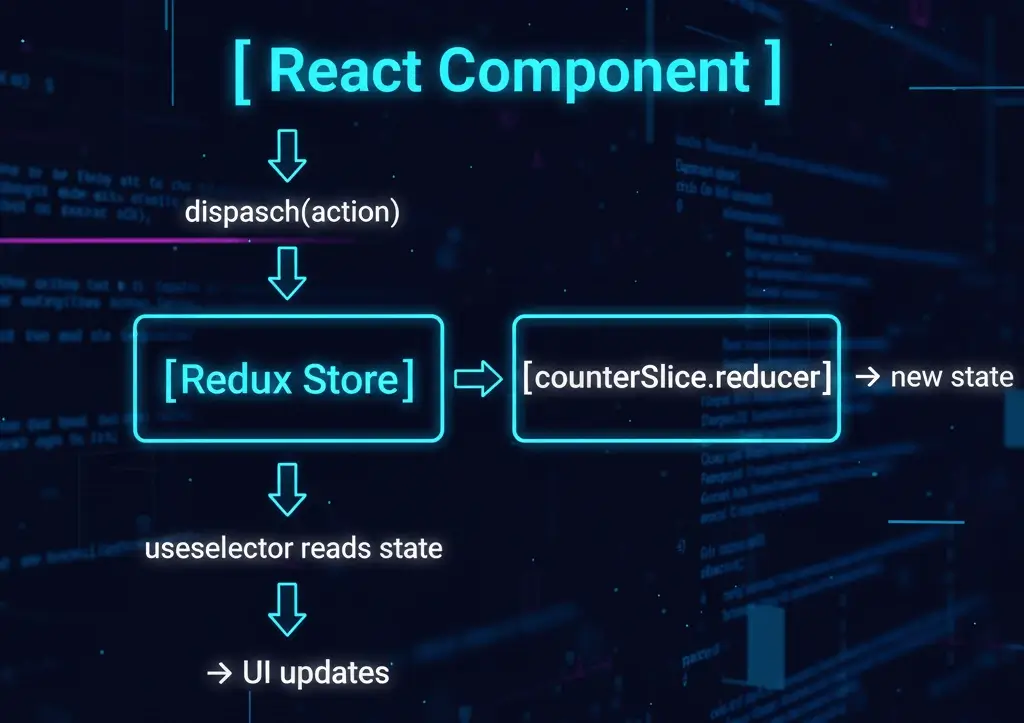
How it flows conceptually:
User clicks "+" → dispatch(increment()) → counterSlice.reducer runs "increment" → state.counter.value changes → useSelector sees new state → React re-renders App with updated value
Why Redux Toolkit Is a Big Deal (Compared to Classic Redux)
In classic Redux, the same counter would require:
- Constants: INCREMENT, DECREMENT, RESET
- Action creators: increment(), decrement(), reset()
- Reducer with switch and manual immutability
- Manual root reducer + store setup
- One slice file
- One store file
- Hooks in components
What’s Next in the Series
In Part 3, we’ll go deeper into connecting multiple slices, structuring larger apps, and making sure your React components stay clean and maintainable as the Redux store grows.
We’ll also touch on:
- Splitting Redux logic by feature (auth, todos, cart)
- Using selectors for derived data
- When to keep state in Redux vs local useState